Real-time Order Notifications
Enabling Lazada’s Push Mechanism allows Lazada to send immediate event notifications to Prism Order whenever a new order is placed, fulfillment status changes, or a cancellation occurs. Without this, orders will still sync via scheduled polling, but updates may be delayed by several minutes.
Registering Your Webhook URL
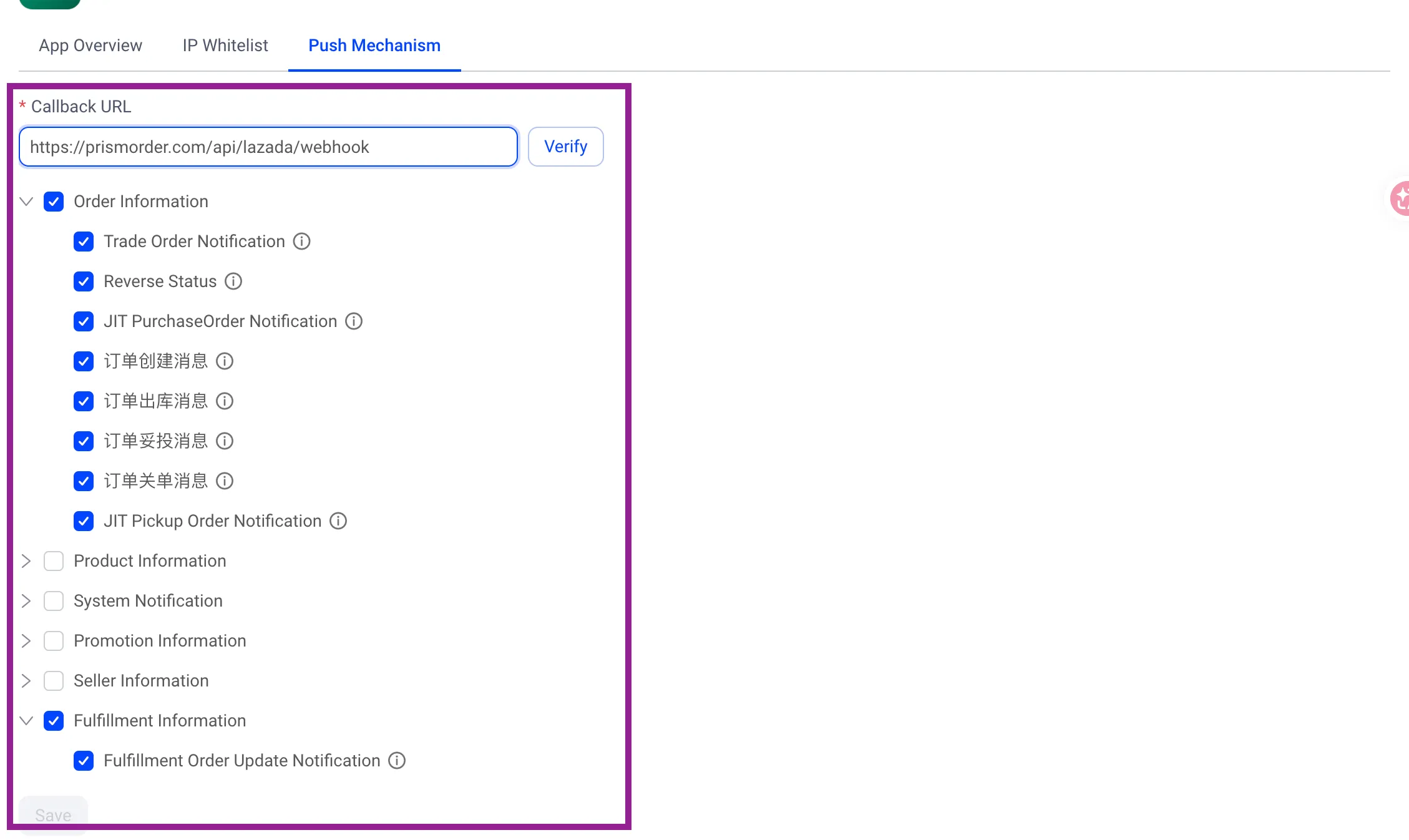
- Log in to the Lazada Open Platform Console, navigate to App Management → your app → Push Mechanism.
- Copy and paste the Prism Order webhook endpoint below into the Webhook URL field:
https://prismorder.com/api/lazada/webhook- Save your settings.
Important Notes
- Shared Webhook Endpoint: All users and connected stores share the same webhook endpoint. Prism Order identifies your account and store securely using the seller identifier and HMAC signature in each payload.
- Store Connection Required: Notifications will start syncing once you connect your store in Prism Order.
Next Steps
Your Lazada console configuration is complete! Next, register your App Key and App Secret in the Prism Order onboarding screen.
👉 Next: Register API Keys in Prism Order